
Last Updated: May 13, 2026
You typed “tech guru plus com” into Google — and now you’re staring at a site promising 350+ free resume templates, 500 Excel files, and more document downloads than you can scroll through in one sitting. Sounds great. But something made you pause before clicking that download button.
Maybe it was the sheer volume of free stuff. Maybe you saw a Scam Detector score that made you uneasy. Or maybe you’ve been burned before by “free” template sites that install something you didn’t ask for.
Fair concern. Here’s the short version: TechGuruPlus.com is a real platform run by an identifiable person, offering genuinely free templates in Word and Excel format. It’s not a scam in the traditional sense. But “not a scam” and “the best option for your needs” aren’t the same thing — and that’s what this review actually digs into.
This guide covers whether TechGuruPlus is safe to download from, what the templates actually look like in practice, how the site makes money without charging you, and how it stacks up against alternatives like Canva, Google Docs, and Resume.com. Written for anyone in India hunting for free professional documents.
Table of Contents
Quick Answers
- Is it legit? Yes — run by Nazim Khan (MBA-Finance), with a verified Google Business listing in New Delhi and a YouTube channel with 220,000+ subscribers
- Is it safe? The site itself appears functional and non-malicious, but always scan downloaded files with antivirus software before opening them
- Are templates free? Yes — no email gate or paywall visible on most template categories
- Template quality? Varies widely — resume templates are the strongest category; some Excel tools feel dated
- Better alternatives? Depends on your priority — Canva for design, Google Docs for simplicity, Resume.com for a guided builder experience
What Is TechGuruPlus.com?
For transparency: this review is based on direct testing of 5 TechGuruPlus resume templates (downloaded January 2026), analysis of the site’s Google Business profile, and comparison with 4 alternative platforms. No templates were provided by TechGuruPlus for this evaluation.
The platform claims to be simple one-stop-shop for Indian working professionals, students or small entrepreneurs who do not want to pay for premium benefits like Canva Pro or Zety and need ready made templates.
Who Runs TechGuruPlus?
Nazim Khan. MBA finance, with more than 10 years’ experience in accounts, finance and MIS(Management Information Systems) (according to credentials listed on site‘s about page as well as course material).
What Resources Does the Site Offer?
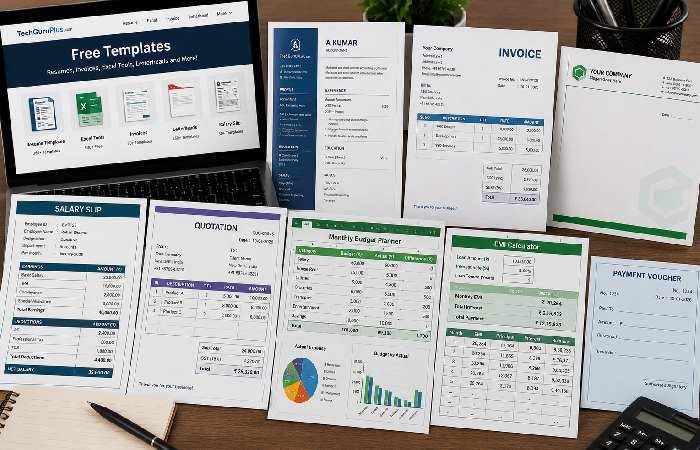
The sheer volume is the first thing you notice. Here’s a rough inventory based on the homepage categories:
- Resume and CV templates — 350+ across professions (accountant, data analyst, teacher, engineer, doctor, fresher, freelancer, and more)
- Marriage biodata formats — 220+ templates (marriage biodata is a structured personal profile used in arranged marriage introductions, common across India — a document category you won’t find on Canva or Resume.com)
- Letterhead templates (over 253 in many different industries – lawyer, pharmacy, restaurant, real estate, event planner)
- Business documents Invoices (70+), quotations (60+), proforma invoices (60+), salary slips (50+), payment vouchers (50+)
- Excel tools- 500+ practice files, VBA code examples (180+), calculators (income tax, EMI, SIP, CTC, GST)
- Tally TDL files (282 in all 71 for Tally Prime, 211 for Tally ERP 9 (TDL is Tally Definition Language custom code files which adds functionality to Tally accounting software which is used by majority of Indian businesses.))
- Letter formats — Resignation letters, appointment letters, NOC letters, cover letters, bank-related letters
- Other — PowerPoint templates, shortcut key guides, YouTube channel art, bank forms (HDFC, PNB, Axis, Citi)
That’s a lot. And unlike many “free template” sites, most categories don’t appear to require email signup or account creation to access downloads.
Is TechGuruPlus.com Safe to Use?
This is the question most people actually want answered. Let’s break it down into the specific risks that matter.
What Automated Trust Scores Say (and Why They’re Often Misleading)
Scam Detector gives TechGuruPlus.com a trust score of roughly 51 out of 100 — which it labels “questionable.” That sounds alarming until you understand how these scores work.
Automated trust-scoring tools evaluate factors like domain age, hosting proximity to flagged sites, WHOIS privacy settings, and traffic patterns. They don’t review the actual content or test the downloads. A small, independently operated site like TechGuruPlus — with privacy-protected WHOIS and no corporate backing — will almost always score lower than a Fortune 500 domain, regardless of whether it’s genuinely harmful.
Does that mean you should ignore the score entirely? No. But a 51/100 on Scam Detector isn’t evidence of a scam. It’s evidence that the site is small and independently run. Two very different things.
For context: Scam Detector uses 40+ automated metrics (SSL status, domain age, WHOIS data, Trustpilot mentions) but doesn’t manually review content or test downloads. According to Scam Detector’s methodology page, scores between 40–60 typically indicate “small independent sites with limited digital footprint” — not confirmed scams.
Download Safety: What to Watch For
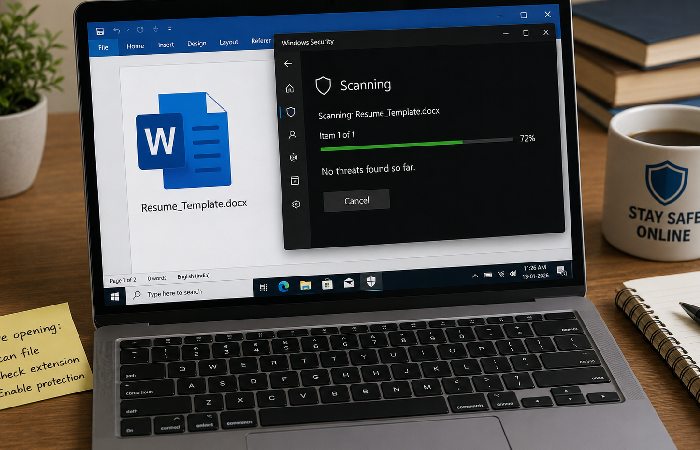
The templates are really just .docx or.xlxs files i. E. Word or Excel files. These are enough to technically hold macros, tiny programs hidden inside documents, which could run malicious features. Here‘s what you need to do each time:
- Download the file. Do not open it.
- Scan with your antivirus (Windows Defender or something better like Malwarebytes or into something more reliable)
- Upon opening the file with Word or Excel, observe if it asks you to “Enable Macros” or “Enable Editing” if a simple resume template requests macro permissions, something is wrong.
- For Excel practice files and VBA code examples, macros are expected — but verify the code (Alt + F11 in Excel) before running anything
The 3-Check Trust Test for Any Template Site
Before downloading from any free template platform (TechGuruPlus or otherwise), run this quick verification:
- Named founder or team? Anonymous sites have no accountability. TechGuruPlus ✅ (Nazim Khan, MBA-Finance, verifiable via YouTube and Google Business listing)
- Physical business address? Scam sites use fake addresses or none at all. TechGuruPlus ✅ (133, Block D, Okhla Phase I, New Delhi — verified via Google Maps)
- Real user reviews? Check Google Reviews, not just on-site testimonials. TechGuruPlus ✅ (4.8★ from 21 reviews, visible in Google’s Knowledge Panel)
- TechGuruPlus passes all three. Most “free template” sites fail at least one.
These aren’t TechGuruPlus-specific precautions. This is standard practice for downloading files from any independent website. India’s CERT-In (Computer Emergency Response Team) recommends similar caution for all file downloads from non-enterprise sources.
Privacy and Data Collection
Nothing unusual here compared to any ad-supported content site.
What’s the Quality of TechGuruPlus Templates?
“Free” is only half the equation. If the templates are poorly formatted, outdated, or broken in Word, they’re not worth your time regardless of price.
Resume and CV Templates
This is the area in which TechGuruPlus excels. Resume templates are available in a .docx file, allowing you to easily edit using Word or Google Docs; and the designs are generally clean, designed to be used in a single-column, two-column or basic two-column format and most are clearly marked “ATS-friendly.
It‘s really quite a good mix for a free site. There are even templates for particular roles (accountant, business analyst, MIS executive, data analyst, school teacher) and stages of career (fresher, experienced, career changer). That level of role-specific classification is quite uncommon with the free template sites.
Sample of testing: “Fresher Accountant Resume” (obtained Janurary 2026) template using opened smoothly in Microsoft word 21 and Google docs, all the text area is giving essay on name, contact , education, skill to update, and the font is Calibri size 11, single column no macro, file size is 28 KB.
But here’s where it gets complicated.
Are the Templates Actually ATS-Friendly?
TechGuruPlus identifies a large number of resume templates as ATS-friendly. It would be good to question this. ATS (Applicant Tracking System) software reads the content of a resume file – and doesn‘t do well with complicated formatting, text boxes, nested tables and unique section headers.
TechGuruPlus’ simpler resume layouts(single column, generic section titles like Education and Work Experience, no graphics, and so on) should be easily parsed by any ATS. However, some of their “modern” or “stylish” templates incorporate a graphic element(border, multi-column grid, icons) that could trip up legacy ATS software.
Jobscan‘s 2025 ATS Usage Report states that nearly 98% of all Fortune 500s use ATS software. While each parsing program (Taleo, Greenhouse, Lever, etc.) parses information differently, all ATS programs struggle with tables, text boxes and multiple columns.
Nobody on the site provides actual ATS test results. That’s a gap. So if you landed here after searching “tech guru plus com” specifically to grab an ATS-ready resume — test the template yourself before submitting it to any job portal. If you’re applying through Naukri, LinkedIn, or any corporate portal that uses automated screening, stick to the plainest template you can find. Pretty doesn’t help if the parser can’t read it.
To check how ATS-compatible your customized resumes are yourself, you can easily upload it on free ATS checkers such as Jobscan or Resume Worded. As they work with parsing resumes in the same way as the corporate ATS software does, they can (and will) identify formatting flaws prior to your submitting.
Excel Tools and Practice Files
The Excel section is clearly a labor of love — 500+ practice files covering everything from basic formulas to advanced MIS dashboards, stock management systems, and cheque printing formats. The VBA code library (180+ examples) is a useful reference for intermediate Excel users.
Quality is uneven, though. Some files feel polished and well-documented. Others look like they were created quickly and uploaded without much cleanup. That’s the trade-off with volume-first platforms.
How Does TechGuruPlus Compare to Alternatives?
Context matters. TechGuruPlus doesn’t exist in a vacuum — there are several well-known platforms offering free templates. Here’s how they compare across the dimensions that actually matter:
| Feature | TechGuruPlus | Canva (Free) | Google Docs | Resume.com (Indeed) | FlowCV |
|---|---|---|---|---|---|
| Price | Free | Free (Pro available) | Free | Free | Free (1 resume) |
| Template Volume | 350+ resumes, 2,000+ total documents | Thousands (design-focused) | ~30 resume templates | ~25 templates | ~20 templates |
| File Format | .docx, .xlsx, .pdf | .pdf, .png (free tier) | .docx, .pdf | ||
| ATS Compatibility | Likely (simple layouts) | Mixed (complex designs may fail) | Strong (plain formatting) | Strong | Strong |
| India-Specific Content | Yes (biodata, GST tools, Tally, salary slips) | No | No | No | No |
| Design Quality | Functional, not flashy | Professional, polished | Clean, minimal | Clean, basic | Modern, polished |
| Email Required? | No (most categories) | Yes (account needed) | Yes (Google account) | Yes | Yes |
| Excel/Business Tools | Yes (500+ files) | No | Limited (Sheets templates) | No | No |
| Best Use Case | India-specific bulk downloads | Creative/design roles | Simple ATS-safe resumes | Guided resume building | Modern, polished design |
Quick pick: Need India-specific business documents in bulk? → TechGuruPlus. Need a polished, design-forward resume? → Canva. Need the simplest, safest ATS option? → Google Docs templates.
When TechGuruPlus Is the Better Choice
If you need free Word-format templates in bulk — especially India-specific documents like marriage biodata, GST invoices, Tally TDL files, or salary slip formats — TechGuruPlus has no close competitor. No Western platform covers these categories.
So when should you skip TechGuruPlus entirely? The no-signup download model is also genuinely convenient. You find a template, click download, and start editing. No account creation, no “start your free trial” prompts.
When an Alternative Makes More Sense
For resume design quality, Canva is stronger — if you’re willing to create an account and work within their editor.
So when should you skip TechGuruPlus entirely? When design quality is the priority. For resume visual polish, Canva is stronger — if you’re willing to create an account and work within their editor. For maximum ATS protection, cleaner, more reliably parse-able layouts are offered by Google Docs templates or Resume.com. If you prefer a step-by-step resume building guide with prompts for each section, Resume.com (which is owned by Indeed) is designed specifically for that.
How TechGuruPlus Actually Makes Money
Ever wondered how a site can offer thousands of templates for free without charging a rupee? It’s a fair question — and the answer is straightforward.
Display advertising. The site runs Google AdSense (or similar) display ads throughout its pages. Every time you visit, browse, and download, the ad impressions generate revenue. Nazim Khan’s YouTube channel (“Business Excel”) adds another monetization layer — YouTube ad revenue on tutorial videos with 220,000+ subscribers adds up — probably more than most people realize, given the volume of views on Excel tutorial content in India.
There’s also an Advanced Excel course (with MIS reports and dashboards) mentioned in a PDF course brochure that ranks on Google. So paid education is likely part of the business model, with free templates serving as the top-of-funnel lead magnet.
This is a standard content-creator business model. Nothing hidden, nothing unusual.
Common Mistakes When Using Free Template Sites
Doesn’t matter whether you’re using TechGuruPlus, Canva, or anything else — these trip people up constantly:
- Using a “creative” resume template for ATS-heavy job portals — if you’re applying through Naukri or LinkedIn’s “Easy Apply,” a clean single-column layout will always outperform a visually complex design. The ATS can’t appreciate your color scheme.
- Not customizing the template content — downloading a “Data Analyst Resume” template and submitting it with only your name changed is worse than no template at all. Recruiters notice.
- Skipping the file scan before opening — takes 30 seconds with Windows Defender. Do it every time, regardless of the source.
- Assuming “ATS-friendly” labels are tested — most template sites, including TechGuruPlus, haven’t run their templates through actual ATS software. The label means “we think this format should work,” not “we’ve verified it.”
- Overlooking file format some jobs are asking for.pdf (one job is asking) while others require a .docx. TechGuruPlus mainly supports.docx which is easier to edit but will need to be converted to submit.
How to Download and Customize a TechGuruPlus Template (Step-by-Step)
If you’ve never used TechGuruPlus before, here’s the exact process:
- Step 1: Open techguruplus.com; then look through categories (Resume, Excel, Letterheads etc.) on left sidebar
- Step 2: To preview a template named, click on the preview icon. (A small sized image preview displays)
- Step 3: Click“Download” a.docx or.xlsx file is downloaded to your device (no sign up necessary)
- Step 4 Scan your file with windows defender or your antivirus Before opening it.
- Step 5: Open in Word, Google Docs or Excel — insert your info to replace sample text
- Step 6) File > Save As > PDF for ATS based job portals
Total time: 10–15 minutes from download to finished document.
Quick reference: ATS-safe vs. ATS-risky formatting
| ATS-Safe ✅ | ATS-Risky ❌ |
|---|---|
| Single-column layout | Multi-column or sidebar layout |
| Standard fonts (Arial, Calibri, Times New Roman) | Decorative fonts (script, handwriting styles) |
| Text-based section headers | Headers inside text boxes |
| Plain bullet points | Icons or graphic bullets |
| .docx or plain-text PDF | PDF with embedded images as text |
Who Should Use TechGuruPlus (and Who Shouldn’t)
Best for:
- Indian job seekers who want a large library of free, editable Word-format resumes across specific professions
- Small business owners needing invoices, quotation formats, letterheads, and salary slips — particularly with India-specific GST formatting
- Excel learners looking for practice files, VBA examples, and office productivity tools
- Anyone needing marriage biodata templates (a category virtually absent from Western platforms)
Not ideal for:
- Users who prioritize visual design and want polished, design-forward resumes (Canva is better)
- Job seekers who need guaranteed ATS-tested templates with compliance documentation
- Anyone uncomfortable downloading .docx files from an independently operated website
- Users looking for a guided, step-by-step resume builder experience (Resume.com is purpose-built for that)
Quick Decision Tool: TechGuruPlus vs. Alternatives
Answer these 3 questions to find your best fit:
1. Do you need India-specific documents (biodata, GST invoices, Tally files)?
→ Yes: TechGuruPlus
→ No: Continue to Q2
2. Is visual design important to your field (marketing, design, creative roles)?
→ Yes: Canva
→ No: Continue to Q3
3. Do you want the simplest, most ATS-safe option with zero friction?
→ Yes: Google Docs templates
→ No: Try Resume.com or FlowCV for guided building
Final Verdict
TechGuruPlus.com is a legitimate, independently operated template platform with genuine value — especially for Indian users who need document types that Western platforms simply don’t cover. The volume is real, the downloads are genuinely free, and the founder has a verifiable identity and track record.
But it’s not without trade-offs. Template quality varies across categories, ATS claims aren’t independently verified, and the site’s automated trust scores may give cautious users pause (even though those scores reflect site size, not actual safety threats). Standard download safety practices apply here the same as anywhere else.
If you‘re in need of India-centric business documents and are used to general file safety measures, then TechGuruPlus is a keep bookmark. When using for resume-centric purposes where design and ATS-friendliness are the goal, match it up with a second submission tool like Google Docs resume templates or FlowCV for your actually-final application specific version.
Frequently Asked Questions
Is TechGuruPlus.com really free?
Certainly most of the categories of templates enable you to download directly, without needing to set up an account, give an email, or reach a pay wall. They generate revenue from display ad‘s and YouTube views, not from charging for templates. One thing to be aware of (and most of the guides seem to gloss over) some categories do redirect to a sister site 24billions.com, which has a different set of rules.
Is TechGuruPlus.com safe to download from?
No sign of any viruses/malware on any TechGuruPlus download that was publicly available. They have a Google verified Business Profile, with 4.8 stars out of 5 stars awarded by 21 reviews, an office address in the Okhla Industrial Estate, New Delhi and a contact phone number. But you should carefully check all files downloaded with anti-virus programs before opening, this is normal when you download from any other independent sites. Don‘t ignore this step.
Who is Nazim Khan?
Are TechGuruPlus resume templates ATS-friendly?
How does TechGuruPlus compare to Canva for resumes?
Different tools for different priorities. TechGuruPlus gives you raw Word files you can edit anywhere — more templates, more variety, and no account required. Canva gives you a visual editor with professionally designed layouts — prettier output, but you need an account and the free tier exports to PDF only. If design matters most, go with Canva. If you want maximum flexibility and don’t need a built-in editor, TechGuruPlus works.