


If you work in Gujarat’s public health system, you’ve likely been pointed to the techo.gujarat.gov.in login portal at some point. Maybe by your supervisor, maybe in a training session, maybe by a colleague who figured it out before you did.
All the features work quite wellonce you‘re configured. The initial access however can be confusing. The credentials are not generated by yourself. The reset process does not always work as you‘d expect. And the view you get at login is determined entirely by your role.
This guide cuts through that. It covers what TeCHO+ actually is, who can (and can’t) access it, how to log in step by step, and what to do when the usual steps don’t work.
Table of Contents
Quick Answers:
- What is it? TeCHO+ is the official state government health portal of Gujarat that manages beneficiaries, health data and health programs.
- Who can log in? Only recognized health staff and admins- ANMs, ASHAs, doctors. Your authourity issues your credentials, you cannot register yourself.
- Login URL: https://techo.gujarat.gov.in/ui/login
- Mobile + offline access? Yes — the TeCHO+ app works offline for field data entry, syncing automatically when connectivity returns.
What Is techo.gujarat.gov.in?
Techo.gujarat.gov.in is the Government of Gujarat’s official web portal under the TeCHO+ (Technology for Community Health Operations Plus) framework. It is an integrated digital platform that aims to do away with paper-based health records, follow up on beneficiaries, and provide instant access to public health information to state authorities.
Their portal links frontline and district health workers and centers of primary health care with State level civil servants in one integrated system. It is not a portal accessible to members of the public to book free appointments, rather it is an interface used by trained government health department officials.
Who Can Use the TeCHO Gujarat Login?
Access to the portal is role-based and restricted to authorized personnel. If you are a general citizen, you will not have login credentials — this is by design to protect patient data.
| User Role | Access Level |
|---|---|
| ANM (Auxiliary Nurse Midwife) | Beneficiary registration, immunization records, maternal health tracking |
| ASHA Worker | Beneficiary tracking, referral updates, visit logs |
| Medical Officer (PHC/CHC) | Patient records, case management, real-time alerts |
| Hospital Administrator | Department dashboards, staff coordination, reporting |
| District Health Officer | District-level analytics, program monitoring, resource allocation |
| State-Level Administrator | Full state dashboard, trend analysis, policy data |
Important: Your User ID and Password are issued by your department or district health authority. New users must be onboarded by a designated admin — there is no public self-registration option.
How to Complete techo.gujarat.gov.in Login – Step by Step
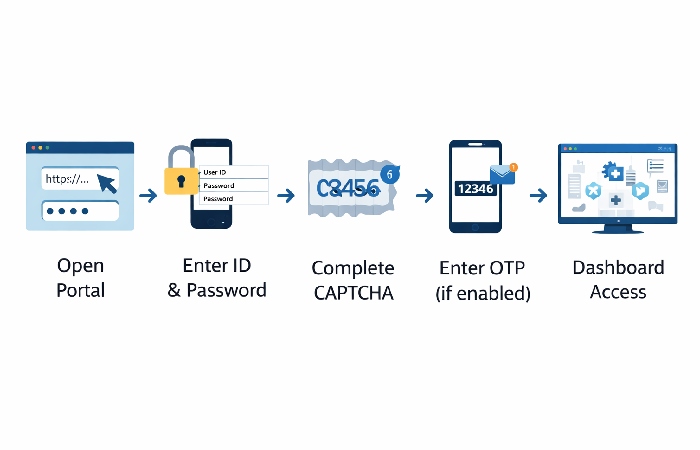
Follow these steps if you already have issued credentials:
- Open your browser and go to: https://techo.gujarat.gov.in/ui/login
- Enter your User ID in the first field (provided by your department or district admin)
- Enter your Password
- If asked, complete the CAPTCHA verification
- If there is two factor authentication 2FA enabled then type the 6 digit code sent to your registered number.
- Input “Login” and press enter to openthe domain of your dashboard
First time login note: you might be requested to change your default password straight away. Pick a secure password and keep it safe in case of recovery you will need administrators’ help.
How to Reset a Forgotten Password
This is where many users get stuck. Unlike consumer apps, TeCHO+ does not always offer a fully self-service reset — it depends on your role and district configuration.
Self-service reset (if enabled for your account):
- Go to https://techo.gujarat.gov.in/ui/login
- Click “Forgot Password”
- Enter your registered mobile number or email address
- Enter the OTP received
- Set a new password, confirm it, and log in
If self-service reset doesn’t work: Contact your district nodal officer or the state helpdesk directly:
- Helpdesk: 1800-233-5500 (toll-free, Mon–Sat, 9 AM – 6 PM)
- Email: helpdesk-techo@gujarat.gov.in
- (Contact details last verified: April 2026)
To be sure of any change or failure for thesecontacts, ring back your District Office or the official Gujarat Health & Family Welfare Department publications.
Features You Can Access After Login
Core Dashboard Features
- Beneficiary Management Register, identify, update and monitor pregnant women, newborns, children, and vulnerable groups
- Immunization Monitoring log all immunizations received with automated indicator for overdue doses
- Maternal & Child Health Monitoring Identify signi œ chentire risk pregnancies and recording them, log all antenatal visits, record all delivery outcomes.
- Real-Time Alerts — Automated notifications for critical cases and missed follow-ups
- Health Program Integration —Data connects with national programs including Ayushman Bharat and Gujarat’s Mukhyamantri Amrutam Yojana, helping health workers manage scheme‑related records more efficiently, depending on how their district has configured the system.”
- Report Generation — Download program-specific audit reports and performance dashboards
Role-Specific Dashboard Views
Not every user sees every module. State administrators see aggregate trend data. Field workers see assigned beneficiary lists. Hospital admins see facility dashboards. The role-based access design prevents viewing of records outside a user’s authorized scope.
The TeCHO+ Mobile App
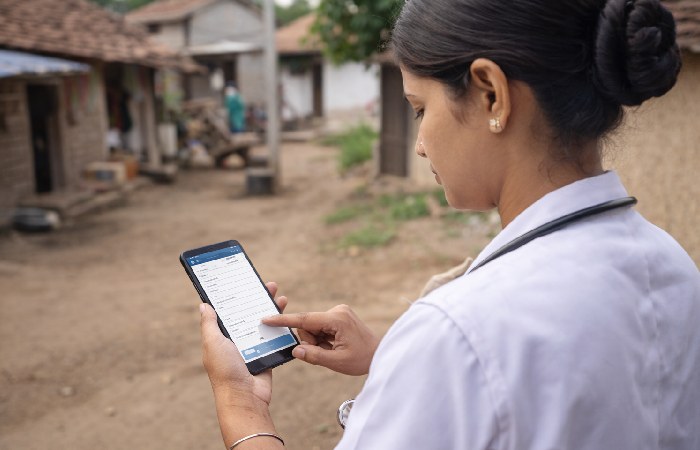
The TeCHO+ mobile app extends portal functionality to field workers without reliable desktop access.
Download: Google Play Store (search “TeCHO+” by Argusoft)
Key Features:
- Register and update beneficiary records from the field
- Log immunizations, maternal visits, and health checks in real time
- Receive push notifications for urgent cases and missed follow-ups
- Offline modality: data entry without internet connection the app saves the entries and synchronizes by itself the records when reestablishing the connection.
Practical tip for rural workers: Enter all field records offline throughout your day. Close the session properly after syncing each evening to avoid data loss. This “enter-sync-verify” pattern is the most reliable workflow for areas with intermittent connectivity.
Common Login Issues and How to Fix Them
Login problems are almost always one of a handful of familiar causes. Here’s every common scenario with a direct fix:
| Issue | Likely Cause | Fix |
|---|---|---|
| “Invalid credentials” error | Wrong username/password or caps lock on | Re-enter carefully; click “Forgot Password” if needed |
| Portal not loading | Browser incompatibility or cached data | Clear browser cache; try Chrome or Firefox updated |
| OTP not received | Network issue or wrong registered number | Wait 2 minutes; confirm your registered mobile with admin |
| Account locked | Too many failed login attempts | Wait 15–30 minutes or call helpdesk: 1800-233-5500 |
| Dashboard loads but data missing | Role not yet configured | Contact your district tech coordinator |
| First-time login fails | Account not yet activated | Confirm with district admin that your account is live |
If your issue persists beyond 24 hours, escalate to your district nodal officer first — most access issues are resolved faster at district level than through the central helpdesk.
Benefits by User Role
- For ANMs and ASHA Workers: No more paper registers. All beneficiary records are stored digitally, reducing duplication and lost data. Automated alerts prompt workers about due visits — essential when managing hundreds of beneficiaries across a wide area.
- For Medical Officers at PHCs/CHCs: Patient history is available at the point of care. Referrals come with background data attached. High-risk cases are flagged before a patient arrives — enabling more prepared consultations and faster emergency decisions.
- For Hospital Administrators: A unified departmental view replaces fragmented paper records. Audit reports generate in minutes. Coordination with PHCs and district offices is logged and traceable.
- For District and State Officials: Program performance is visible in real time — vaccination coverage rates, maternal health trends, scheme enrollment data. No waiting for manually compiled reports. Resource allocation decisions are based on live data, not last month’s papers.
Who This Portal Is For — And Who It’s Not For
Best suited for:
- ANMs, ASHAs, and Anganwadi workers in Gujarat
- Medical officers and staff at PHCs, CHCs, and district hospitals
- District health administrators and nodal officers
- State government employees managing Gujarat’s public health programs
Not for:
- General citizens — TeCHO+ is an administrative backend, not a citizen service portal. Gujarat has separate services for citizens seeking health scheme information.
- Private hospital staff — Unless specifically integrated under a state program with authorized credentials
- Individuals seeking personal health records — Separate citizen-facing portals exist for that purpose
Final Thoughts
The techo.gujarat.gov.in login portal does what it was built to do: give Gujarat’s health system a shared digital backbone. But it’s only useful if you know how to use it — and who to call when something breaks.
One thing worth repeating: if you’re stuck, contact your district nodal officer before calling the general helpdesk. They know your specific role configuration and district setup. They’ll resolve most problems faster than a central line will.
And for all the ASHAS and ANMs working in download than sync areas (like me for example!): TeCHO+ has a kickass offline mode that works great. Get it, love it, use it and sync soon.
Frequently Asked Questions
Q1: Who issues TeCHO+ login credentials?
Credentials are issued by your district health authority or the department that onboarded you. You cannot self-register. Contact your district nodal officer if credentials haven’t been provided after joining.
Q2: Can I access techo.gujarat.gov.in from my phone without the app?
Yes. The portal is available in the available http://techo.gujarat.gov.in/ui/login for mobile browsers. For field workers using the available TeCHO+ app (Google Play) will have offline data entry.
Q3: What should I do if my account gets locked?
Wait 15-30 minutes and then retry again. If still showinglockedyou may contact us at 1800-233-5500 (Mon-Sat, 09:00-18:00) or helpdesk-techo@gujarat.gov.in.
Q4: Is the data submitted through techo.gujarat.gov.in secure?
Yes. Health Department, Government of Gujarat is currently administering the portal. By leveraging role-based access controls and in many cases OTP, two-factor authentication etc. portal makes every effort to secure patient records.
Q5: How does TeCHO+ connect to Ayushman Bharat and other schemes?
TeCHO+ leverages beneficiary data connected with Ayushman Bharat and the state scheme, MUKHYAMANTRI AMRUTAM YOJNA, so that frontline health workers can check whether a person is eligible and input scheme records there on. Done in real time, no further data entry needed.
Q6: What if the portal is down or very slow?
Attempt again after 30–60 minutes. Field workers can continue entering data on the offline mode of teCHO+ app during portal downtimes & the data will automatically get sync once internet is available.
About Globalmarketingguide
Globalmarketingguide.com shares down-to-earth, plain English articles on health, technology, business, marketing, and lifestyle. Information is sourced primarily from credible, open sources and digital tools are used solely to assist with research, structuring and communication so the emphasis remains on practical value to the reader rather than use of technical language.
Disclaimer
This guide is a stand-alone information source based on the way TeCHO+ generally functions in 2026. Always follow the instructions given by the Gujarat Health & Family Welfare Department or district nodal officer for official procedures, contacts and configuration details.