

You searched for Quikconsole.com and probably hit a wall of contradictions. One article calls it a developer console. Another calls it a gaming dashboard. A third calls it an AI productivity platform. And yet — when you actually visit the site — none of that seems to be there.
This review is based only on publicly observable information at the time of writing and is not affiliated with Quikconsole.com or any related domain.
Here’s the short answer: Quikconsole.com is a multi-topic blog. Not a console tool. Not an AI system. Not a gaming management platform. It publishes short, introductory articles on computers and technology, personal finance, health and lifestyle, and travel – for the average person looking for a quick, easy read.
The confusion isn’t accidental. It reflects a common SEO pattern where articles describe a site as something far more complex than it actually is — which then generates more searches, which generates more SEO articles, which deepens the confusion further.
This guide walks you through what the site actually shows today, why so many contradictory descriptions exist, how to assess it for safety, and what to use if you came here looking for a real tool.
In creating this guide, we used what anyone can check on their own: visiting the live site, reviewing minimal WHOIS information, seeking out ownership and policy statements, and cross checking with thirdparty independent reviews.
In our own checks we detected only what could be observed without logging in, installing anything or jumping over the user flows.f
Table of Contents
Key Takeaways
| Question | Answer |
|---|---|
| What is Quikconsole.com? | A multi-topic blog — tech, finance, health, lifestyle articles for beginners |
| Is it a dev console / AI tool / gaming dashboard? | No. None of those features exist on the live site |
| Is it safe to use? | Low risk as a blog; don’t share sensitive data; ownership is not transparent |
| Who owns it? | Unknown — no About page, no named team, masked WHOIS data |
| What should I use instead? | Depends on what you were looking for — see the alternatives table below |
What Is Quikconsole.com? The Direct Answer
Quikconsole.com is a multi-topic content website that publishes beginner-friendly articles across several general categories. In reality, quikconsole.com is a simple multi-topic blog that publishes beginner-friendly articles on technology, finance, health, lifestyle, travel, and digital marketing — it does not offer any interactive tools, dashboards, AI features, or automation.
That’s the whole story at the platform level. But it’s worth being specific about what you actually encounter when you visit, because most articles skip this part entirely.
What the Homepage Actually Shows Today
Clean layout. Standard blog structure. Article previews in a grid, organized by category. Navigation tabs for Tech, Finance, Health, Lifestyle, and Travel. A “Read More” button on each post. No login area. No interactive console. No command-line interface.
The articles use simple language aimed at everyday readers — you might find quick explainers on cloud storage options, Bitcoin basics, or lifestyle advice. The writing stays light and easy to follow, without heavy technical details.
That’s it. A blog. A functional, loading blog — but a blog.
What Quikconsole.com Does NOT Offer
Worth being direct here, because the gap between what’s been written about this site and what it actually provides is genuinely wide:
- No interactive developer console or command-line environment
- No AI-powered workflow tools or automation
- No gaming console management dashboard
- No server monitoring, CPU tracking, or uptime alerts
- No login-gated features of any kind
- No cloud storage, file conversion, or productivity utilities
- No identifiable founding team, company, or product roadmap
It does not have any interactive dashboard, AI tools, cloud storage, or gaming management features. There is no login area for advanced functions and no real-time analytics. The site works purely as an informational blog.
Why Does Everyone Describe Quikconsole.com Differently?
This is honestly the most interesting part of the story — and no other article really explains it.
How the SEO Content Loop Works

Here’s the mechanism. A site with an ambiguous name — “console” is a loaded word in tech circles — gets a handful of early articles that speculate about what it might be or describe it optimistically. Those articles rank. People click. They see “console” in the name, assume it’s a tool, and search more. That search volume signals to other content producers that this is a popular topic. They write articles. Those articles frequently echo the original speculation — sometimes adding new features that were never there — because the goal is to rank for the traffic, not to provide an accurate review.
For example, one early explainer might describe Quikconsole as an “AI‑powered cloud console.” Later posts then repeat that wording, add phrases like “developer IDE” or “gaming dashboard,” and cite each other rather than the live site itself.
Many of those external posts read like generic SEO or affiliate‑style content: they repeat similar claims, offer little firsthand detail about actually using the site, and rarely explain how their authors evaluated it. The high number of searches for “quikconsole.com” has led to even more articles being written — creating a cycle where misleading claims keep spreading.
The result? A site that is, in observable terms, a basic blog has accumulated dozens of articles describing it as an AI-powered cloud management platform, a gaming console dashboard, a developer IDE, and a team collaboration hub. Each description sounds plausible in isolation. None match the actual site.
How to recognise this pattern elsewhere
If you search any brand name and see very similar articles repeating the same claims, but the actual site does not match those promises, you are likely looking at the same SEO loop. Pay more attention to what the live product or site shows than to recycled descriptions in third‑party posts.
Why This Pattern Matters for Your Decision
It matters because the question “is Quikconsole.com legitimate?” is the wrong question. The better question is: legitimate as what?
As a blog that publishes short articles on general topics? Yes — it loads, it functions, it’s not flagged as malicious.
As any of the tools described in those promotional articles? No — those tools don’t exist there.
The term “QuikConsole com” has surged in search engine trends largely because many similar blog posts recycle the same language without offering firsthand reviews — a pattern that suggests the name is being targeted for traffic more than for documented product experience.
Is Quikconsole.com Legitimate? A Transparency Check
Calling a site “legitimate” means different things depending on context. Here, we’re checking the baseline trust signals that any credible website — blog or tool — should have.
Common online red flags (and how to interpret them)
Use the signals below as a quick interpretation guide whenever you are assessing an unfamiliar site, including but not limited to Quikconsole.com.
| Signal you notice | What it usually means in practice | How to react |
|---|---|---|
| No About page or team information | Low transparency; hard to verify who is behind the site | Treat content as low‑authority |
| Masked WHOIS domain registration | Owner identity hidden (common, but removes accountability) | Don’t share sensitive information |
| Generic or hard‑to‑find privacy policy | Little clarity on data handling or jurisdiction | Avoid forms, logins, and uploads |
| No real social presence or community | Limited track record; fewer user reviews or discussions | Cross‑check info on better‑known sites |
| Conflicting descriptions across domains | Branding used loosely for traffic, not a clear product | Be skeptical of marketing claims |
Ownership and Contact Information
Despite its sudden rise, QuikConsole com has no clearly listed About page, no identifiable developers, and no social media channels that confirm its background or leadership.
No named founder. No company address. No contact email that’s easy to find. For a simple blog, that’s unusual but not automatically alarming — but it does mean it is much harder to know who is accountable if content is inaccurate or if the site’s behavior changes.
Privacy Policy and Terms of Service
Transparency of the site is poor there is no clear information as to ownership or where the company is based. Privacy policies and terms of service are difficult to locate.
Before engaging with any site particularly one where the owner isn‘t transparent it‘s helpful to consider these. The FTC‘s guidance on evaluating online services is a good place to start in knowing what site disclosures might be expected. Missing or insufficient privacy policies aren‘t evidence in themselves, but it means you agree to whatever isn‘t there:
Domain Age and WHOIS Data
The domain looks fairly new according to the WHOIS data, which lends some suspicion that it may not be quite ready and secure. You can check this out yourself. The ICANN WHOIS lookup tool shows all the registration details, the registrars, whether the registrants details are forwarded, or concealed using a privacy proxy. This domain‘s WHOIS data is concealed – there is neither a company name, About page, or contact details that look that credible, and there are no team members, or developers companies named.
Trust Signal Audit:
| Signal | Status | What It Means |
|---|---|---|
| Named About page | ❌ Missing | No accountability for content or behavior |
| Identifiable team/founders | ❌ Missing | Can’t verify expertise or credibility |
| Privacy policy | ⚠️ Vague/hard to find | Unclear how your data is handled |
| Terms of service | ⚠️ Limited | Limited recourse if something goes wrong |
| HTTPS/SSL | ✅ Present | Basic transport security — standard for most sites |
| WHOIS ownership | ⚠️ Masked | Domain details hidden via privacy proxy |
| Active social media presence | ❌ Absent | No community or public accountability signals |
| Clear domain history | ⚠️ Short history | Recently registered — no long-term track record |
Is Quikconsole.com Safe to Use?
Depends on what you mean by “use.”
Reading an article on the site? Low risk. It is content. You are not installing anything, sharing credentials or authorizing any data access by just reading a post. You can verify if a domain throws up alarms off Google‘s Safe Browsing transparency report. (Google Safe Browsing lets you know if Google‘s detected bad stuff on a domain).
But there are boundaries worth respecting:
Do these things:
- Treat it as a casual reading source, not an authoritative reference
- Verify any factual claims you find there using more established sources
- Check the URL carefully — several look-alike domains exist (quikconsoles.com, quikconsole.co, quik-console.com) and not all are the same site
Avoid these things:
- Don’t create an account with a real email address or password you use elsewhere
- Do not download any files or software from the site or a link on it Please do not enter personal information such as finances, health issues, or other identifiable information on any of the forms you come across
- If any of that on this page seems wrong, or a page suddenly starts forwarding you to someunexpected website, make sure you hit the back button and not the close button onthe tab
Do not upload sensitive data, personal information, or financial information, or download any software from it — the mix of low transparency, absence of detailed public reviews, and limited independent reputation signals makes it too risky for anything sensitive.
Quick checklist: how to sanity‑check any unfamiliar site
Before you trust any new domain — not just quikconsole.com — run through this quick mental checklist:
- Is the website clearly display who you can‘t remember It‘s run (About page, company name, real call details)?
- Is there a clear, easily readable privacy policy in place? Does it describe what data is being collected and for what purpose?
- Are social icons linked to actual active profiles or rather redirect to the home page?
- Are you able to find authentic thirdparty discussion/ reviews outside of the SEOstyle blog?
- Does the site require users to give more information than it needs?
If there are mostly “no” or “I don‘t know” responses, consider the site read only and do not disclose any information you wouldn‘t post on a public site.
What Were You Actually Looking For? Alternatives by Use Case
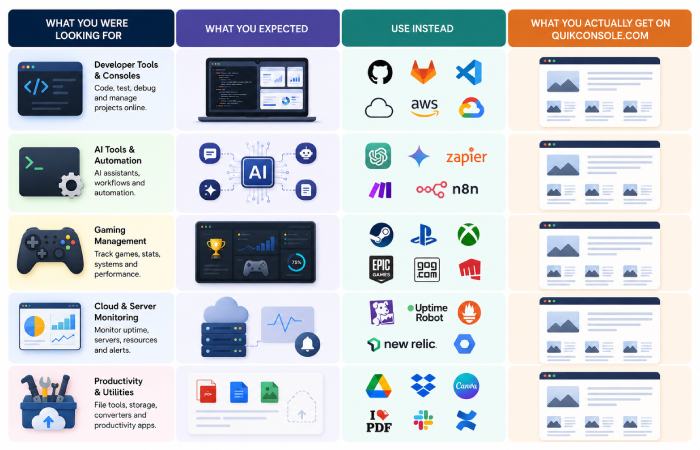
This is where most articles stop at “use AWS instead” without asking what you actually needed. Here’s a cleaner way to think about it.
Use this table as a starting point: match what you originally hoped Quikconsole would do to a class of tools that actually specialise in that job.
| If you wanted… | Better alternative | Key limitation to know |
|---|---|---|
| A real developer console / terminal | AWS CloudShell, Google Cloud Shell | Requires cloud account; learning curve for beginners |
| Server management and monitoring | Datadog, Uptime Robot (free tier) | Datadog is enterprise-level; overkill for solo projects |
| A coding environment in the browser | Replit, VS Code for the Web | Replit has free tier limits; VS Code Web needs GitHub |
| Gaming console management | PlayStation App, Xbox App, Nintendo Switch Online | Each works only with its own ecosystem |
| Lightweight productivity/task tools | Notion (free), Trello (free tier) | Notion has a steeper learning curve; Trello is simpler |
| File conversion / web utilities | PDF24 Tools, TinyWow | Both free; TinyWow has daily limits |
| General tech articles / beginner guides | How-To Geek, MakeUseOf | More established editorial standards |
Platforms like Notion, Trello, and ClickUp have powerful task management and workflow integrations – PDF24 Tools and TinyWow supersede, and are tested/verified, better file utilities, and have active communities. For genuine consoles, the PlayStation App, Xbox App, and Nintendo Switch Online have trusted, official apps to remotely play, check storage, and stay connected.
Please note that these are wellknown options, not sponsored recommendations and you should though to go through the instructions given on each provider‘s own documentation and policy before you try to use any of them.
Who Should — and Shouldn’t — Bother With Quikconsole.com
It might be worth a look if you:
- Want a casual, easy-reading blog on mixed topics (tech, finance, health, travel) with no paywall
- Are researching what the site is and want to see it firsthand — 30 seconds on the homepage answers most questions
- Are curious about the SEO content loop phenomenon and want to see a real example
It’s not the right choice if you:
- Need a functional developer console, server monitor, or coding environment
- Are looking for verified, expert-reviewed technical documentation
- Want to manage your gaming consoles remotely from one unified dashboard
- Need a productivity platform for a team or a business
The mismatch isn’t a flaw in your judgment. Much of this traffic comes from people expecting the advanced tool described in promotional articles, only to find a simple blog instead. That expectation gap is the entire story.
When you’re evaluating any platform in future, prioritise sites that clearly state who runs them, how they handle data, and how long they’ve been operating — those basics go a long way toward avoiding sites that do not clearly demonstrate who they are or how they operate.
Final Verdict
Quikconsole.com is a basic multi-topic blog. It works. It loads. It poses no more than a very minor risk to anyone who clicks and reads a post. But it is not and no independent verification can find that it ever has been, a developer‘s console, an AI tool, a gaming management portal or any of a dozen other things it is said by dozens of promoted articles to be.
The assessment is all about what is readily accessible to the casual browsers, and information gathered at the time of writing, changes of ownership, features or policies may mean that this is an inacurate picture of the reality.
The non-existent ownership transparency, not having any mention of owners, no documentation and concealed WHOIS data make this not what you‘d expect from any legitimate and credible website, blog, community or platform.
If you came here looking for a specific tool, the alternatives table above has what you need organized by use case. If you came here just to figure out what this site is — you now know. If you want to double‑check, spend a few minutes on the homepage and category pages yourself, run a basic WHOIS lookup, and search for independent discussions on forums or social platforms — you should see the same picture this article describes.
Frequently Asked Questions
Q: Is Quikconsole.com a real tool or just a blog?
A: It is a blog. Quikconsole.com provides Short, easy-to-understand articles and blogs on subjects such as mobile, technology, finance, health and fitness, travel, education, digital marketing etc. No tools, consoles or dashboards are present on the live site.
Q: Is Quikconsole.com a scam or malware site?
A: There is no public evidence that quikconsole.com distributes malware or directly runs payment scams. That said, the site’s low transparency and over‑inflated descriptions in some third‑party content mean you should treat it as a low‑trust information source and avoid sharing any data or credentials you want to keep secure.
Q: Is Quikconsole.com safe to use?
A: Safe for reading low risk. However, don‘t use it with sensitive data, don‘t create accounts with real details, never download it. Ownership is non-transparent, and there is little evidence of who owns it or where the company is located and it is hard to find detailed privacy policies and terms of service.
Q: Why do so many articles describe Quikconsole.com as an AI tool or developer console?
A: SEO content loop. The site has gained attention mainly because of the conflicting descriptions online — this mismatch has led to more articles being published, which drives even more searches. It’s a good example of how SEO content can create its own demand. The articles aren’t reviewing the live site — they’re borrowing descriptions from each other.
Q: Who owns Quikconsole.com?
A: Unknown. QuikConsole com has no clearly listed About page, no identifiable developers, and no social media channels that confirm its background or leadership. WHOIS data is masked. There’s no verifiable company name or founding team attached to the domain.
Q: What should I use instead of Quikconsole.com?
A: It varies according to what you wanted. For server administration, go to AWS CloudShell or Datadog. For game administration, official PlayStation App, Xbox App or Nintendo Switch Online. For productivity tool, Notion and Trello both have reliable free options. For web general utilities, two free products are PDF24 Tools and TinyWow.
Last updated: 11 May 2026. Information on websites other than (3 rd party sites) may have been updated, check the live domain and policies when discussing outdated information.